- Introduction
- “New" technologies on the Internet. How do they work? Are they overcoming any problems in the existing architecture? Do they invalidate any of our assumptions? Do they provide opportunities?
- Today: File-sharing, VoIP, and video-streaming.
- Commonalities: All deal with P2P networks, or related constructs (CDNs).
- File-Sharing: Getting a File from One Person (Machine) to Another
- Can use client/server:
- Client requests file, server responds with the data.
- HTTP, FTP work this way.
- Downsides: Single point of failure, expensive, doesn’t scale.
- Could use CDNs:
- Buy multiple servers, put them near clients to decrease latency.
- No single point of failure, scales better.
- See the next recitation for more discussion.
- Can use client/server:
- Peer-To-Peer (P2P) Networks for File-Sharing
- Distribute the architecture to the extreme.
- Once a client downloads (part of) the file from the server, that client can upload (part of) the file to others. Put clients to work!
- In theory: Infinitely scalable.
- P2P networks create overlays on top of the underlying Internet (so do CDNs).
- Problem: What if users aren’t willing to upload?
- BitTorrent: How to Incentivize Peers to Upload
- Basics of original BitTorrent (BT) protocol:
- Create a .torrent file, which contains meta-information about the file (file name, length, info about pieces that comprise the file, URL of tracker).
- Have a tracker. A server that knows the identity of all the peers involved in your file transfer.
- To download:
- Peer contacts tracker.
- Tracker responds with list of other peers involved in transfer.
- Peer connects to these other peers, begins to transfer blocks (see below).
- Some peers are seeders: Already have the entire file (maybe servers that host the file, or just nice peers who are sticking around).
- In the actual download, peers request blocks: pieces of pieces.
- Details/terminology doesn’t matter. Just know that blocks are small (~16KB) chunks of the file.
- Request blocks in a random order (more or less).
- What incentivizes users to upload (UL) rather than just download(DL)ing?
- High-level: Users aren’t allowed to DL from a user unless they’re also ULing to that user.
- So peers want mutual interest: A has to have blocks that B needs, and vice versa.
- Protocol is divided into rounds. In round n, some number of peers upload blocks to Peer X. In round n+1, Peer X will send blocks to the peers that uploaded the most in round n. (Typically, to the top four peers.)
- How do peers get started? Each peer reserves some (small) amount of bandwidth to give away freely.
- High-level: Users aren’t allowed to DL from a user unless they’re also ULing to that user.
- This method of incentivizing peers is part of what allowed P2P file-sharing to take off.
- Lingering problem: tracker is central point of failure.
- Most BT clients today are “trackerless”, and use Distributed Hash Tables (DHTs) instead.
- Basics of original BitTorrent (BT) protocol:
- VoIP: Voice over IP
-
Talking specifically about Skype, a proprietary system.
-
Skype used to use a P2P network for two things: To improve performance, allow certain connections to work at all.
-
Recall the first networking lecture. Internet bred NATs: Network Address Translators.
- Consider client A behind a NAT, who wants to initiate a connection to server S. A’s IP is private (can’t route to it); S’s and N’s are public.
A — N —- S
- A sends a packet: [to:S from:A].
- N rewrites the header: [to:S from:N].
- and stores some state.
- S receives it, sends response back to N: [to:N from:S].
- N uses stored state to figure out that this packet is really meant for A.
- N will keep track of the port(s) that A is communicating on. Communication via those ports is then meant for A.
-
Now imagine two clients, both behind NATs:
A — N1 —- N2 — S
- Now A doesn’t even know S’s IP (private IPs aren’t routable). It also doesn’t know N2’s IP; it has no way to get that.
- For Skype: Means that A and S can’t call each other.
- Skype provides a directory service, so assume we can get N2’s public IP. When N2 gets packet destined for S, it has no idea what to do with it.
- (See Lecture 13 slides (PDF) for example.)
-
Skype will employ an additional node—a “supernode”—P, with a public IP, and route A and S’s calls through P:
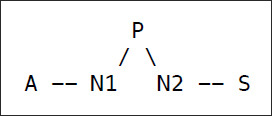
- P keeps a bunch of state to get this to work, and A and S must both be registered users of Skype. A and S will connect to P as part of starting up their Skype client (so private IP users initiate connections to public IPs).
- In reality, there is not one supernode, but a network of supernodes. A, S are both connected to nodes in that network, and the overlay network routes data between them.
- P keeps a bunch of state to get this to work, and A and S must both be registered users of Skype. A and S will connect to P as part of starting up their Skype client (so private IP users initiate connections to public IPs).
-
Seems like this will affect performance, so Skype only let you be a supernode if your memory/CPU is sufficient (and you have a public IP).
-
Good idea?
- A/S might not want their (encrypted) call routed through someone else.
- P might not want to pay to transit traffic for A and S.
-
Today: Microsoft owns all of the supernodes, making this less of a P2P network and more of a hierarchy.
- Skype also claims that its P2P system improves quality by allowing for more optimal routing.
-
- Video-Streaming (Briefly)
- Can we just use BitTorrent to stream (live) video?
- Streaming requires getting blocks (roughly) in order.
- Also requires certain amount of bandwidth at all times.
- Probably not:
- BT works because peers can acquire blocks in any order.
- Moreover, most BT peers are on residential links, which have underwhelming upload bandwidth.
- What’s good for streaming? CDNs!
- Thursday’s recitation: What CDNs bring to the table that P2P networks don’t.
- Also think about whether you want to reconsider CDNs for file-sharing.
- Can we just use BitTorrent to stream (live) video?
Week 7: Networking Part III
Lecture 13 Outline
Course Info
Instructor
Departments
As Taught In
Spring
2018
Level
Topics
Learning Resource Types
Instructor Insights
notes
Lecture Notes
grading
Projects with Examples
assignment
Written Assignments